
Phone.com Express Sign-Up Integration Guide
Version: 1.0.23 @ 2025-10-08T20:09:38.418Z
Demo: express-signup-demo.cit-phone.com
Overview
Phone.com offers Express Sign-Up functionality for partners to enable them to provide Phone.com services to their customers.
This integration requires approval and cooperation with Phone.com. If you haven't been in touch with us yet, please reach out to our support team.
Services Offered Through Express Sign-Up
Customers onboarded via Express Sign-Up can choose from the following services:
- Call Forwarding
- Intelligent Answer Bot
- Intelligent Answer Bot Plus
- Live Receptionist
How It Works
You need to import our Express Sign-Up library, run its components, and implement a few endpoints in your server-side application.
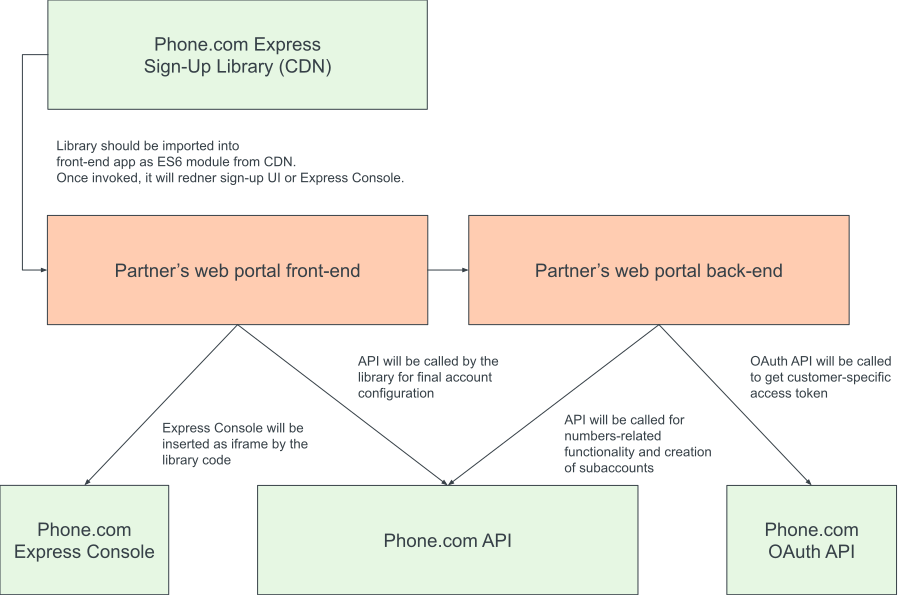
Full integration
Express Sign-Up library is flexible, so it could be different setups, but the most Phone.com-based setup includes usage of Phone.com billing and authorization. In that case we will take care of your integration's back-end.
Requirements
Partner Portal Requirements
- Server-side functionality (calls to Phone.com API) should be executed by endpoints protected by authorization (to be executed in the context of the specific partner's customer).
- The front-end application of the Portal should support ES6 JavaScript modules.
Phone.com Account Configuration
- Phone.com account with enabled subaccounts functionality (requires approval) - you will need to know the "voip_id" of the account.
- Permanent token for API Access (can be obtained via our API Client Service once the account is created).
Integration
Server-Side Application + Phone.com API
API calls related to the sign-up are meant to be performed from your server-side application with your access token. Thus, you will need to create some endpoints which will act as a proxy between your customers and Phone.com API.
Create Subaccount
The endpoint should send a username, password, and contact to the Create Subaccount API endpoint.
Please make sure that you create accounts for real paying customers because you will be billed for the services they consume.
Username
You should generate a username in a way that it will be associated with some identifier of the user of your Portal and be unique for Phone.com. For example, it can be super-partner-12345, where super-partner is the name of your business and 12345 will be the ID of the user in your system.
Password
You can generate long random passwords and securely store them or don't store them at all - in that case, you will need to use the token of your main account as a password, but this option is disabled by default and requires approval from Phone.com.
Contact
Contact can be requested at the client-side or, if there is a contact on file, it can be used without asking the customer to provide it.
NodeJS Example
async function createSubaccount(username, password, contact) {
    const { token, voip_id } = getPhoneComAPIConfig();
    const res = await fetch(`https://api.phone.com/v4/accounts/${voip_id}/subaccounts`, {
        headers: { Authorization: `Bearer ${token}` },
        method: 'POST',
        body: JSON.stringify({ username, password, contact }),
    });
    if (!res.ok) throw new Error('Something went wrong');
    return await res.json();
}
If Phone.com Billing is being used, you may also need to provide billing_contact and credit-card token
Get Phone.com Access Token for the User
Once the user signs up, you need to generate a token for that specific user which will be used by the client-side application.
If you don't store passwords, you will need to use your account's token as a password.
NodeJS Example
async function getPhoneComTokenForUser(username, password = null) {
    const { token } = getPhoneComAPIConfig();
    const q = new URLSearchParams();
    q.append('redirect_uri', 'https://express.phone.com');
    q.append('response_type', 'token');
    q.append('scope', 'account-owner');
    const url = `https://oauth-api.phone.com/client/6b75f80c-3390-5409-1c05-b9f7bfd778b6/authorization?${q.toString()}`;
    const res = await fetch(url, {
      method: 'POST',
      body: JSON.stringify({ username, password: password || token }),
    });
    const payload = await res.json();
    if (res.ok) return payload;
    console.warn(payload);
    return null;
  }
Front-End Application + Phone.com Express Sign-Up Library
Our library is hosted at express-signup-lib.cit-phone.com.
It uses ES6 import/export functionality, so you can only import it into a JavaScript file included into the page as a module:
<script type="module" src="/integration.mjs"></script>
integration.mjs will look like this:
import ExpressSignUpFlow from 'https://express-signup-lib.cit-phone.com/latest/index.mjs';

// ...
const expressSignUp = await ExpressSignUpFlow.init('PARTNER_ID', options, callback);
expressSignUp.render(document.getElementById('express-sign-up-container'));
// ...
Express Sign In Flow
If the user has not yet created a Phone.com account, you should render the ExpressSignUpFlow component.
It accepts two arguments - options and callback. callback is the function which will be called when sign-up is finished successfully. options define the component's behavior.
Available Options
Most Important Options
partner:string, required. ID of the partner (it will be provided by Phone.com)errorCallback:function. This callback is invoked if something goes wrong. Arguments are[string] message,[boolean] isCritical = falseand[Error|null] originalError = nullcreateSubaccountCallback:function, required. This callback is supposed to create a subaccount number via your endpoint which uses Phone.com API for creating subaccounts. It accepts argument[object] payloadwhich contains information associated with the sign-up.getAccessCallback:function, required. This callback is supposed to retrieve an access token for the customer via your endpoint which uses Phone.com API for creating an access token.numberPickerMode:string, default:classic. Number picker mode (classicorai).customSearchQueryFilters:object, default:null. Filters for number search endpoint.
Styling
tagMode:boolean, default:false. If enabled, the library will use logic markup instead of<div>and<span>tags.cssLocation:string, default:null. Allows defining an alternative CSS location.useStyles:string, default:true. If false, non-essential styles will be disabled.stripeElementsAppearance:object, default:{ appearance: { theme: 'none' } }. Stripe element appearance. Read more at https://docs.stripe.com/elements/appearance-api (relevant only if Phone.com billing is being used)stripeElementsConf:object, default:{}. Stripe element generic config. It is relevant only if Phone.com billing is enabled for the integration.
Other Options
numbersSearchCallback:function. This callback is supposed to retrieve information from your endpoint which uses Phone.com API to search for numbers. It accepts argument[URLSearchParams] query. By default, it is processed through the public API endpoint. Unless there are specific requirements, overriding it is unnecessary.reserveNumberCallback:functionornull. This callback is supposed to reserve a number via your endpoint which uses Phone.com API for number reservation. It accepts argument[object] payloadwhich contains an object associated with the specific phone number returned by the search numbers endpoint. By default, it is processed through the public API endpoint. Unless there are specific requirements, overriding it is unnecessary.verifyEmailCallback:function. This callback is supposed to call Phone.com endpoint for email verification. By default, it is processed through the public API endpoint. Unless there are specific requirements, overriding it is unnecessary.firstStepBackCallback:function. Defines what to do if "Go Back" was called during the first step. If not define, link will be hidden.onStepChangeCallback:function. Callback for step change event.creditCardIntegrationCallback:function. Callback for obtaining credit card integration information. By default, it is processed through the public API endpoint. Unless there are specific requirements, overriding it is unnecessary.addCreditCardCallback:function. Callback for adding credit card. By default, it is processed through the public API endpoint. Unless there are specific requirements, overriding it is unnecessary.getTaxesCallback:function. Callback for calculating taxes. By default, it is processed through the public API endpoint. Unless there are specific requirements, overriding it is unnecessary.customizeSearchQuery:function, default -null. Customization ofURLSearchParam queryobject being used for numbers search.defaultContact:object, default:null. Default contact (see example below).readOnlyContact:boolean, default:false. Defines if the contact form should be editable.allowToCollectStatistics:boolean, default:true. Defines whether statistics collection is allowed.numberPickerMaxPrice:number, default:14900. Maximal price of the phone number in cents.numberPickerPageLimit:number, default:24. Phone numbers limit (one page).numberPickerPaginationMode:boolean, default:true. Defines if to show pagination in Number Picker.numberPickerColumns:boolean, default:true. Defines if to show pagination in Number Picker.numberPickerDefaultPrompt:string, defaultnull. Prompt to load initial numbers.numberPickerDefaultQuery:URLSearchParams,Objectorstring, default -null. Query string for loading initial numbers via List available numbers API endpoint.sortNumbersCallback:function, default - sorting by price, ascending. Sorting function for loaded numbers.termsOfServiceURL:string, default - Phone.com Terms of Service page. URL of the Terms of Service page.privacyPolicyURL:string, default - Phone.com Privacy Policy page. URL of the Privacy Policy page.pdcBilling:boolean, default:false. Use Phone.com billing (should be coordinated with Phone.com representatives).pdcAuthorization:boolean, default:false. Use Phone.com authorization service (should be coordinated with Phone.com representatives).oneContactMode:boolean, default:true. It merges "Add payment method" and "Overview" steps (pdcBillingmode must be enabled).experimentalMode:boolean, default:false. Allows to use non-production features.voipServiceCode:integer, default:17012. Internal Phone.com code for the service. It doesn't affect what we use in Phone.com, but it should match if taxes are being calculated with the logic of this library.
Contact Example
{
    "name": "FirstName LastName",
    "company": "Book Depository",
    "address": {
        "line_1": "411 Elm, st.",
        "line_2": "",
        "city": "Dallas",
        "province": "TX",
        "postal_code": "75202",
        "country": "US"
    },
    "phone": "+15555550001",
    "primary_email": "test@example.com"
}
Express Console
When the customer already has a Phone.com account or just signed up, you should render the ExpressConsole component of the Library. It requires an access token generated for the user.
ExpressConsole.init accepts 3 arguments - partner, options and callback. callback is the function which will be called when the user decides to sign out from the Express Console. options define the component's behavior.
Available Options
token:object, required. Data received from the endpoint which gets an access token for the user.partner:string, required. ID of the partner (it will be provided by Phone.com)